SindriCAD: Free Parametric CAD for 3D Printing (Linux, Windows, Mac)
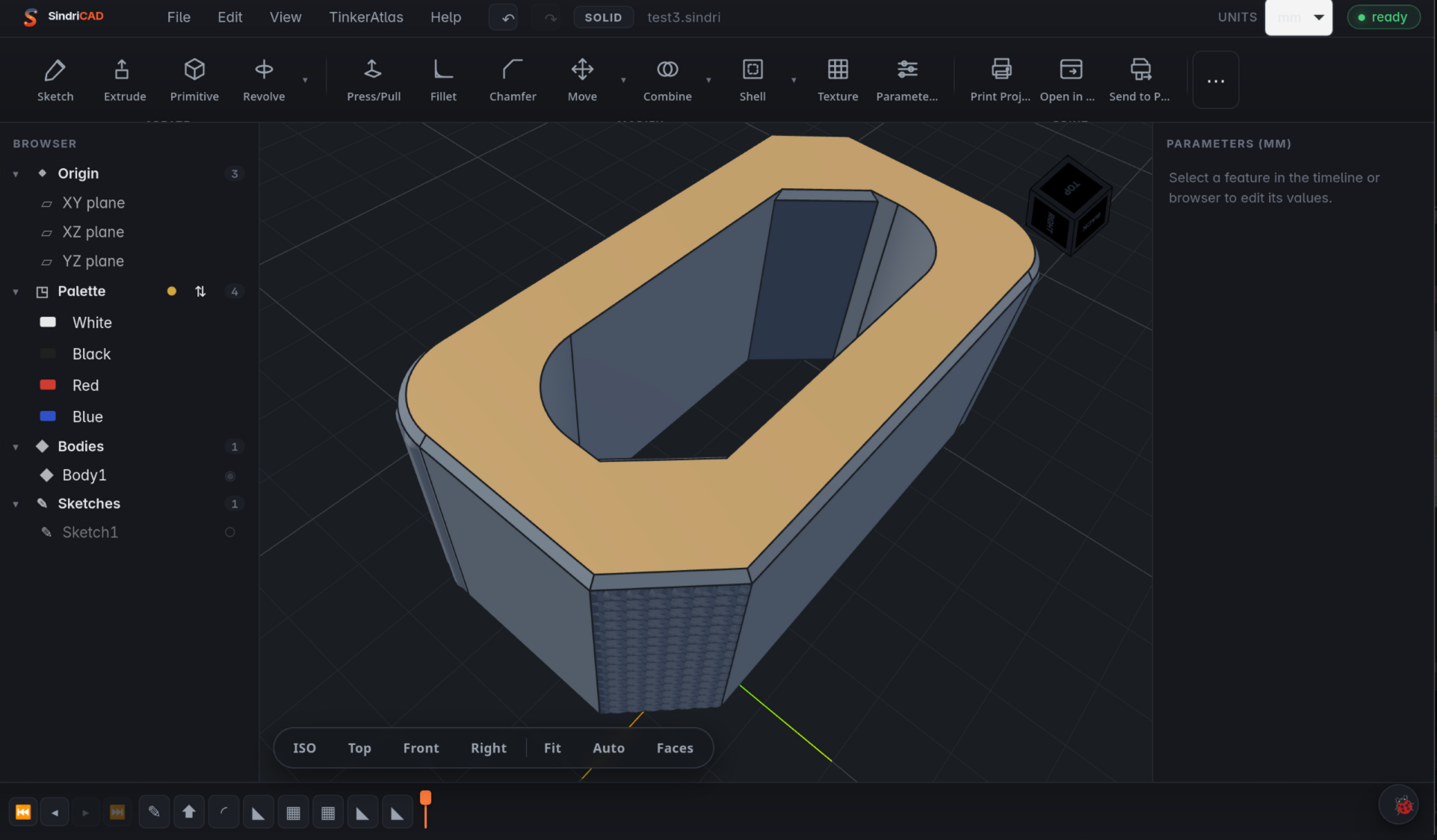
Short answer: SindriCAD is a free, open-source parametric CAD app built for 3D printing. It runs natively on Linux, Windows and macOS. You sketch, extrude, fillet and pattern a part, and every step stays editable in a feature tree. It exports STL, STEP, 3MF and GLB, including multi-colour 3MF for multi-material printers, and it has a built-in print pipeline for the Snapmaker U1. It's my own project, it's in open beta, and in 2026 it won a $1,500 third prize in Snapmaker's U1 Innovation Fund.
Disclosure: I'm the developer of SindriCAD. It's free and AGPL-licensed, and this guide describes the public beta as of 29 October 2026.
Download SindriCAD free at tinkeratlas.com/sindricad (Linux, Windows and macOS installers, release notes and tutorials).
What is SindriCAD?
SindriCAD is a history-based solid modeller for people who design parts to 3D print. It isn't a mesh editor, and it doesn't have its own geometry kernel. It drives build123d on top of OpenCASCADE for the geometry, and puts a modelling interface and a print workflow on top. It started on Linux, where good parametric CAD has always been thin on the ground, because the professional CAD package I relied on doesn't run there. It's named after Sindri, the dwarven master smith of Norse myth.
Is SindriCAD free?
SindriCAD is free and open source under the GNU Affero General Public License v3.0 (AGPL-3.0-only). There's no account, no subscription and no trial timer. Installers for Linux, Windows and macOS are on the rolling beta release on GitHub and on tinkeratlas.com/sindricad. If it earns a place in your workflow, you can support development on Patreon (MuninWorks).
What can SindriCAD do?
SindriCAD is a full parametric modeller with the everyday toolset, according to its README:
- Sketching: lines, arcs, circles, splines, rectangles, slots, polygons and text in system fonts. It has associative patterns (bolt circles, grids, honeycomb) and a PlaneGCS constraint solver. You type dimensions on the canvas, press Tab to lock them and Enter to commit.
- Parameters and expressions: name a value once, use it anywhere, and change one number to rebuild the whole part.
- Features: Extrude (new body, join, cut, intersect), Revolve, Loft, Sweep, Press/Pull, Fillet, Chamfer, Shell, Draft, Scale, Mirror and patterns.
- Direct editing: Move with a live preview, Split, Combine, Delete Face with automatic healing, and Offset Face and Thicken.
- Surface textures: knurls, honeycombs, waves and Voronoi cells pressed into a surface as real geometry rather than a bump map, so they survive the slicer.
- Measure and section tools: check wall thickness and clearances before you print.
- References that survive edits: geometry is picked by descriptors such as an axis or face normal, never by a topology index, so a downstream fillet still lands on the right edge after you change an upstream dimension.
Which file formats does SindriCAD support?
SindriCAD is compatible with STEP, BREP, STL, 3MF, OBJ and GLB for import, and exports STEP, STL, 3MF and GLB. Imported STEP files come back as editable faces, and a STEP assembly keeps its tree of subassemblies and part names. Multi-colour 3MF export keeps filament slot and colour assignments when opened in PrusaSlicer.
How does SindriCAD work with the Snapmaker U1?
SindriCAD's Snapmaker U1 print pipeline is a built-in route from a coloured parametric part to a running print, without a manual export dance:
- Multi-material 3MF: assign palette colours to bodies and export an OrcaSlicer project 3MF with per-body extruder (tool) mapping for the U1's toolchanger.
- Slicer handoff: "Open in OrcaSlicer" loads the U1 preset with your process and filament settings, ready to slice.
- Direct device layer: upload G-code to the printer over the LAN with a filament-mapping dialog, read the palette back from the printer, and monitor the running print.
That pipeline is what Snapmaker recognised. SindriCAD was one of 20 Phase 1 winners in the Snapmaker U1 Innovation Fund, chosen from 67 entries according to Snapmaker's winners post. It won a $1,500 third prize for "open-source parametric CAD with full sketch constraints and direct 3MF export with per-body extruder mapping for U1". If you're choosing a printer for multi-material work, see why I rate the U1 in my recommended 3D printers.
How do I install SindriCAD?
Installing SindriCAD is a single download per platform, and everything is bundled, including Python and the geometry engine. The builds are unsigned, so the first launch needs one extra step:
- Download the installer for your platform from tinkeratlas.com/sindricad (the same builds are also on the GitHub beta release).
- On Linux and Windows, install and run it normally, and confirm the unsigned-app prompt.
- On macOS, the first launch is refused. Allow it by hand in System Settings under Privacy & Security. The README's Install section has the exact steps.
Eight short tutorial clips (sketch and extrude, fillet, chamfer, shell, parameters, press/pull, combine and revolve) are in the SindriCAD tutorial playlist.
Is SindriCAD ready for real work?
SindriCAD is a beta in ongoing development. It already builds real printed parts, but the feature set is still filling out and rough edges remain. Expect frequent releases, report what breaks on GitHub issues, and keep backups of documents you care about.
FAQ
Does SindriCAD run on Linux?
SindriCAD is Linux-native: it started on Linux and also runs natively on Windows and macOS.
Is SindriCAD a FreeCAD or Fusion 360 alternative?
SindriCAD is a free parametric CAD alternative aimed at 3D printing. It follows the workflow and keyboard shortcuts most makers know from mainstream parametric CAD, but it focuses on printable parts rather than engineering drawings.
Can SindriCAD export multi-colour 3MF?
Multi-colour 3MF export is supported, including OrcaSlicer projects with per-body tool mapping for the Snapmaker U1. Filament assignments also survive when the file is opened in PrusaSlicer.
Where can I download SindriCAD?
SindriCAD downloads are on its official page, tinkeratlas.com/sindricad, with installers for Linux, Windows and macOS. It is free, with no account needed.
What license is SindriCAD?
SindriCAD is licensed under AGPL-3.0-only, so any modified version offered over a network must publish its source under the same terms.
More from me: slicer settings that matter, OrcaSlicer vs PrusaSlicer vs Cura, and models and tools on TinkerAtlas.
Ready to try it? Get SindriCAD at tinkeratlas.com/sindricad.